
If you’re preparing for an ABRSM digital Performance Grade, chances are you’ve been stuck with the same doubts I had:
- Can ABRSM online exam video be edited?
- Can ABRSM Performance Grade video be edited?
- Can ABRSM digital grades video be edited?
- Can I record the intro separately for ABRSM exam?
- Will ABRSM reject my video if I join two clips?
I went through forums, YouTube videos, Reddit threads, and even contacted ABRSM (global as well as local support) directly. The answers online are confusing and often contradictory.
This blog clears it up properly, based on official clarification and real submission experience.
The Most Important Rule (Understand This First)
For ABRSM digital Performance Grades, the core rule is simple:
The performance must be one continuous, unedited take.
That is the only non-negotiable rule.
Not the intro.
Not the setup.
Not the beginning.
Only the performance of the pieces.
Can ABRSM Online Exam Video Be Edited?
Yes, but only partially.
You can edit the video, but only in the pre-performance section.
- Editing the introduction is allowed
- Editing the performance is not allowed
So if you’re wondering “Can ABRSM exam video be edited?” the correct answer is:
Yes, but never inside the performance.
Can ABRSM Performance Grade Video Be Edited?
Yes, but only before the playing begins.
You can:
- trim the beginning
- trim the end
- add the introduction separately
- combine clips
You cannot:
- cut between pieces
- fix mistakes
- stitch multiple takes
Can ABRSM Digital Grades Video Be Edited?
Yes, in a limited way.
ABRSM allows editing of the pre-performance procedures, which includes:
- spoken introduction
- showing documents
- setup elements
The performance section must remain untouched.
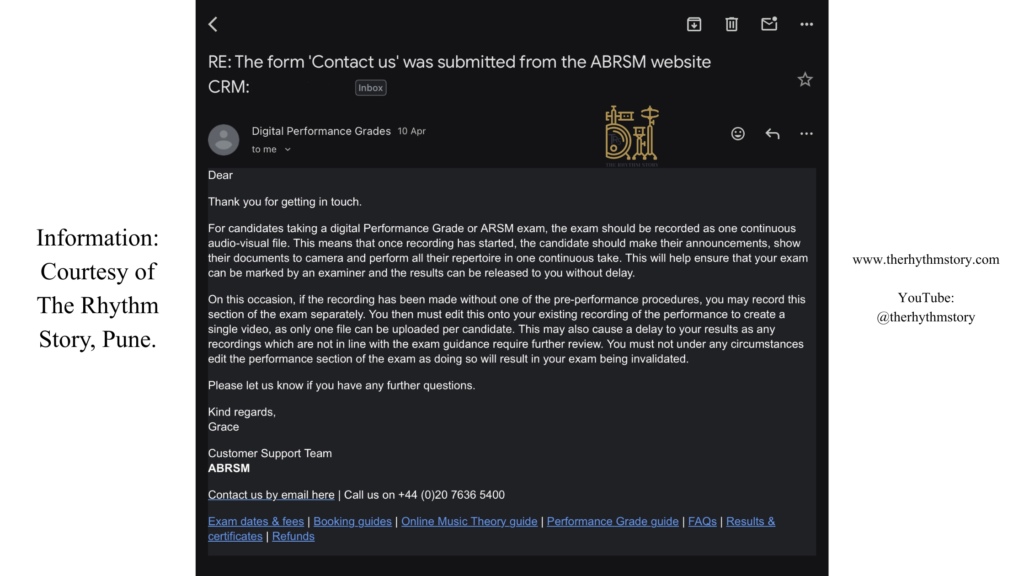
Can I Record the Intro Separately in ABRSM Exam?
Yes. This is officially allowed.
If you forgot to record the introduction, you can:
- Record the intro separately
- Attach it before the performance
- Upload as one final video
This is explicitly permitted as long as the performance remains continuous.
Can I Stitch Intro and Performance Together for ABRSM?
Yes.
This is a very common workflow used by teachers:
Intro recorded separately
Performance recorded in one take
Both combined into one file
As long as the performance is not edited, this is acceptable.
Does ABRSM Allow Joining Two Videos?
Yes.
You can join clips, but only if:
- the performance section is untouched
- the final file is a single video
Can ABRSM Exam Video Have Cuts?
Yes, but only before the performance starts.
- Cuts in intro section are allowed
- Cuts during performance are not allowed
Can I Trim the Beginning or End of ABRSM Video?
Yes.
You can safely trim:
- extra silence at the start
- unnecessary footage at the end
Can ABRSM Exam Video Have Transitions?
ABRSM does not explicitly mention transitions.
However:
- transitions before performance are generally fine
- transitions during performance are not allowed
To be safest, use a simple cut.
Will ABRSM Reject Edited Videos?
Only if the performance is edited.
Your video may be rejected if:
- you stitched multiple takes of a piece
- you edited timing
- you manipulated audio
Editing the intro will not cause rejection.
Can I Fix Mistakes in ABRSM Video?
No.
If a mistake happens, you must re-record the entire performance.
Can ABRSM Performance Be Recorded in Parts?
No.
All pieces must be performed in one continuous take:
Piece 1
Piece 2
Piece 3
Piece 4
Can I Restart Between Pieces in ABRSM?
No.
Can I Pause Recording During ABRSM Exam?
No.
Can ABRSM Intro Be Separate?
Yes.
Can I Add Intro Later in ABRSM Video?
Yes.
Can I Combine Clips for ABRSM Exam Submission?
Yes, as long as the performance is untouched.
Can ABRSM Exam Be Recorded in Multiple Takes?
No, not for the performance.
Can I Edit Audio in ABRSM Exam Video?
No, not in the performance section.
Can I Improve Audio Quality Before Submission?
Best to avoid processing.
Keep it natural and clean.
Does ABRSM Check Video Editing?
They check:
- continuity
- authenticity
- performance integrity
They are not analysing cinematic edits, but obvious manipulation will be flagged.
Can Teacher Be Visible in ABRSM Exam Video?
No assistance is allowed.
What If Teacher Reflection Is Visible?
Minor reflections are usually fine, but best avoided.
Can I Use Final Cut or DaVinci Resolve for ABRSM Video?
Yes, but only for:
- trimming
- joining clips
- exporting
No editing of performance.
What File Format Should ABRSM Video Be?
- MP4 or MOV
- Under 2GB
Is 1080p Allowed in ABRSM Exam?
Yes.
720p is recommended, but 1080p works if file size is within limit.
Can ABRSM Exam Be Vertical Video?
Yes, if:
- student is clearly visible
- instrument is visible
Does Intro Affect Marks?
Not directly.
But it affects first impression.
What Is the Biggest Mistake in ABRSM Digital Exams?
Editing the performance.
That is the only real danger.
Final Clarity
Here is the entire rule in one line:
Intro is flexible
Performance must be continuous
You can:
- record intro separately
- stitch intro
- combine clips
You cannot:
- edit performance
- fix mistakes
- splice takes
Real-World Workflow (What Teachers Actually Do)
Many teachers use this exact method:
Record intro separately
Record performance in one take
Combine both
Upload final video
This is widely accepted.
Conclusion
If you’re confused about ABRSM video rules, remember this:
The examiner is judging your playing, not your editing.
As long as your performance is:
- continuous
- natural
- unedited
You are safe.